
How to Set Up Your Mobile Device for Optimal Performance
In today’s fast-paced world, mobile devices play an essential role in our everyday lives. Whether it’s for communication, work, or leisure, knowing how to set up your mobile device can enhance your experience significantly. This article serves as a comprehensive guide to help you configure your mobile device for optimal performance.
1. Choose the Right Network Settings
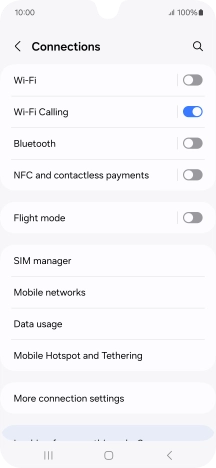
When setting up your mobile, the first step is to ensure that you have the right network configurations. This includes connecting to Wi-Fi and mobile data. Navigate to the Settings app, then:
- Tap on Network & Internet
- Select either Wi-Fi or Mobile Data
- Follow the prompts to connect to your desired network.
2. Configure Your Display Settings
Your mobile device’s display settings can greatly affect usability. Start by adjusting the brightness and font size for comfortable viewing:
- Go to Settings > Display.
- Adjust the Brightness Slider as needed.
- Consider enabling Night Mode to reduce eye strain in low light conditions.
- Change Font Size or display size under the same menu if necessary.
3. Install Essential Applications
Installing the right applications can improve your productivity. Consider these categories when choosing apps:
- Communication: WhatsApp, Messenger, or Slack for messaging.
- Productivity: Google Drive, Trello, or Microsoft Office for work management.
- Social Media: Instagram, Facebook, or Twitter to stay connected.
- Entertainment: Spotify or Netflix for leisure enjoyments.
4. Customize Notifications
Customizing notifications is essential to prevent distractions while ensuring you don’t miss important updates. Here’s how:
- Access Settings > Apps & notifications.
- Go through each application to manage notifications settings accordingly.
- Turn off notifications for apps that are not essential but keep them for critical ones.
5. Update Your Mobile Device
Keeping your device’s software updated is vital for performance and security. Ensure your operating system and apps are up to date:
- Go to Settings > System.
- Select Software update and check for updates.
- Install any available updates.
6. Set Up Security Features
Your mobile device holds substantial personal information. It’s crucial to set up security features:
- Enable Screen Lock: Choose from PIN, Password, or Biometrics (fingerprint or face recognition).
- Consider enabling Find My Device in case it’s lost.
- Utilize mobile security solutions such as antivirus or anti-malware applications.
7. Organize Your Home Screen
A well-organized home screen can improve accessibility and efficiency. Here are some tips:
- Create folders for similar apps to minimize clutter.
- Place frequently used apps on the home screen for easy access.
- Consider using widgets for quick information at a glance, such as weather or calendar views.
8. Backup Your Data
Regular data backup is important to ensure you don’t lose crucial information. Set up a backup schedule:
- Access Settings > System > Backup.
- Choose to back up to your Google account or utilize external storage solutions.
9. Explore Accessibility Features
Most mobile devices come equipped with accessibility settings. Explore these features to enhance ease of use. For example:
- Text-to-speech capabilities for reading text aloud.
- Magnification gestures for better visibility.
- Adjustable color settings for those with visual impairments.
Conclusion
Setting up your mobile device effectively is essential for maximizing its potential and enhancing your overall experience. By following the steps outlined in this guide, you’ll ensure that your mobile device is not only functional but also tailored to meet your needs.

For more insights and detailed information on mobile proxy setups, you can visit this How to Set Up Mobile Proxies to Work with Facebook Ads https://crazyfb.shop/en/page/kak-nastroit-mobilnye-proksi-dlya-raboty-s-facebook-ads.